Claim and redeem Anuma Tokens for credits
Anuma Tokens earned from locking ZETA convert into Anuma credits in two on-chain steps: claim and redeem. Both happen from the Anuma Access dashboard.
How the two steps differ
| Step | What it does | When you do it |
|---|---|---|
| Claim | Moves accrued Anuma Tokens from the staking contract into your wallet as an ERC-20 balance | When your claimable balance is large enough to be worth the network gas |
| Redeem | Burns Anuma Tokens from your wallet and grants you credits inside Anuma | When you want to spend tokens on the platform |
You can claim and redeem in the same session, or claim now and redeem later. Claiming costs ZetaChain network gas (paid in ZETA); redeeming is gasless — the portal handles the burn for you.
Steps
Step 1: Open Anuma Access
Tap Anuma Access in the sidebar. Scroll to the Redeem Anuma Token For Credits section near the bottom of the dashboard.
Step 2: Claim your Anuma Tokens (if needed)
Your dashboard shows two balances:
- Claimable Anuma Token — tokens earned but still sitting on the staking contract
- Redeemable Anuma Token — tokens already in your wallet, ready to redeem
If your claimable balance is greater than zero, tap Claim Anuma Token. Your wallet prompts you to confirm the transaction. Once it confirms, the tokens move from the contract to your wallet and your redeemable balance increases.
Step 3: Open the Redeem modal
Tap Redeem Anuma Token to open the redeem flow.
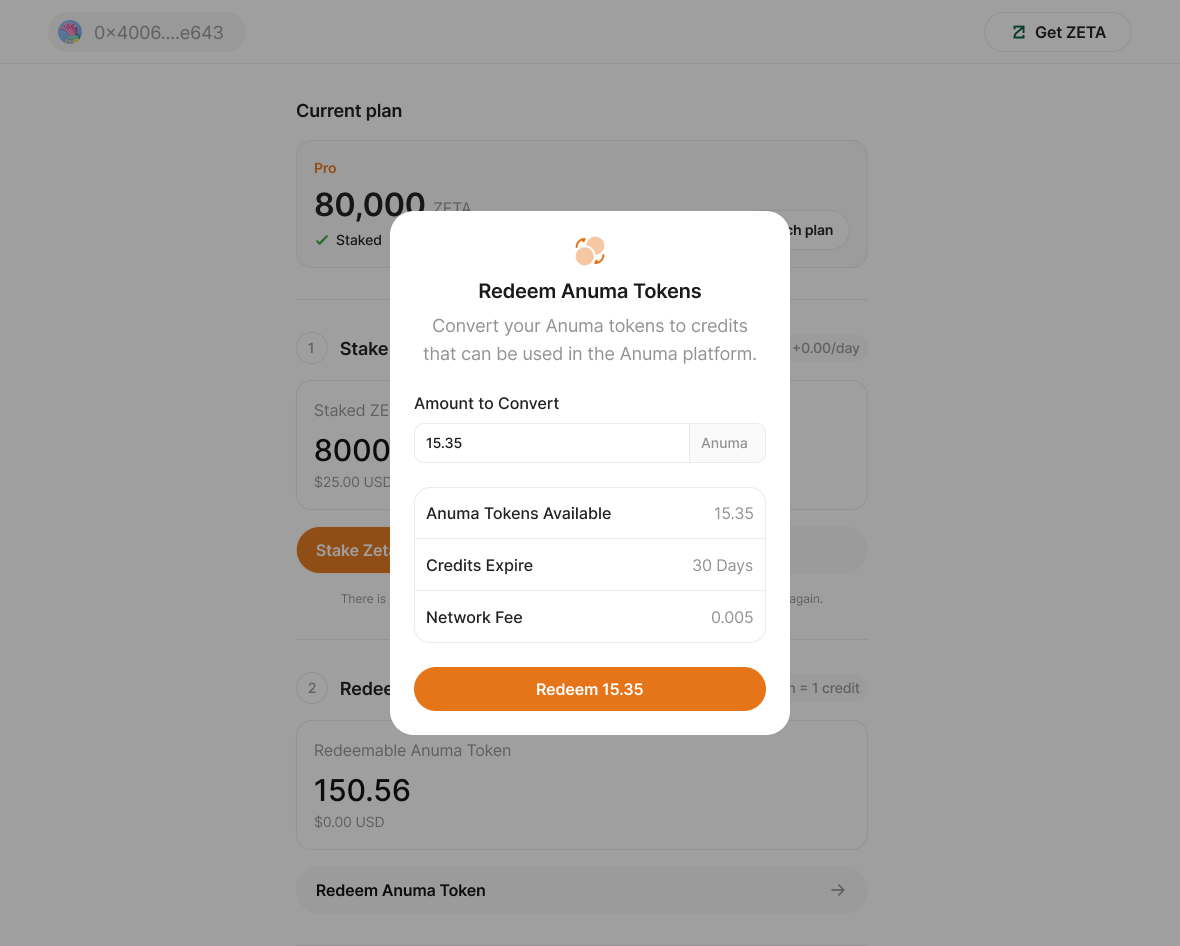
Step 4: Enter how many tokens to convert
Type the amount of Anuma Tokens to redeem. The modal shows:
- Anuma Tokens Available — your current redeemable balance
- Credits Expire — credits issued by this redemption will expire in 30 days
1 Anuma Token = 1 Anuma credit. There’s no exchange rate or slippage.
Step 5: Tap Redeem
Redemption is gasless. The Anuma portal burns your tokens server-side using the AnumaToken contract’s operator function — no wallet signature is required and you don’t pay ZetaChain gas for this step. Your credit balance increases as soon as the burn confirms on-chain, and you can start using the new credits right away.
After redemption
Your dashboard reflects the new state:
- Redeemable Anuma Token decreases by the amount you redeemed
- Tokens redeemed lifetime counter increases
- Credit balance increases by the same number
- Credits expire date shows when the newly issued credits will expire
Credit expiry — how to plan
Credits from redemption expire 30 days after they’re issued. To avoid losing unused credits:
- Redeem in small batches. Convert only what you expect to spend in the next month.
- Let unspent earnings stay as Anuma Tokens. Tokens in your wallet (or on the contract) don’t expire — only the credits do.
- Watch the expiry date on the dashboard. If credits are about to expire, plan a high-usage session or hold off on redeeming more.
Good to know
- Claim requires ZETA in your wallet to pay network gas. Redeem is gasless — the portal handles the burn, so no wallet signature or gas is needed.
- If you try to redeem more than your wallet balance, Anuma will automatically claim first to top up your wallet, then redeem in the same flow.
- The redemption rate (1:1) is fixed in the contract — it does not change based on ZETA price, plan tier, or amount.
- Tokens cannot be refunded after redemption. Once burned, they’re gone; the credits are issued in exchange.
- Redemptions are recorded on-chain — you can verify any redeem transaction on ZetaScan using the transaction hash.
Related articles