Texting an Anuma agent via SMS or iMessage
AI that texts back. Text Anuma directly from your phone using iMessage or SMS — no app needed, no wifi required. Text solo or add it to your group chats.
Two AI contacts
- Anuma — For 1:1 productivity. Text +1 (415) 994-5505. Ask questions, get answers, generate images, and more.
- Coco — For group chats. Add Coco to any group conversation for shared AI assistance.
Steps
Step 1: Save the contact
Save Anuma’s number (+1 415-994-5505) to your contacts. You can text right away — no account setup needed for your first 50 messages.
Step 2: Connect your account (optional)
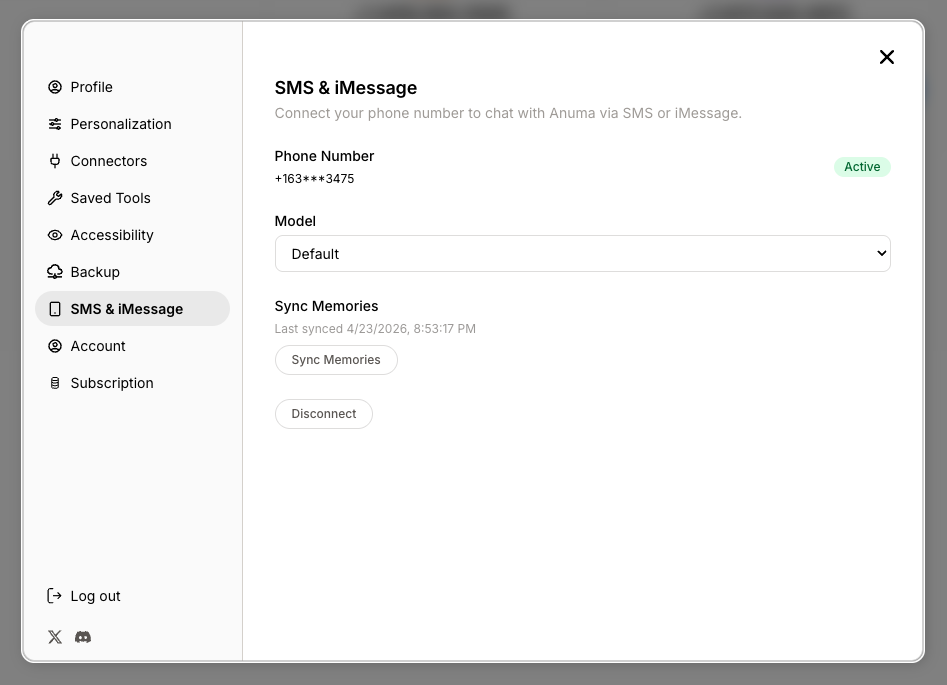
To sync your texting with your Anuma account and Your Memories, go to Settings (tap your profile icon), then select SMS & iMessage from the panel list. Enter your phone number to link it.
Step 3: Choose your preferred model
Once connected, use the Model dropdown in SMS settings to select which AI model handles your text conversations. You can choose from vision-enabled models.
Step 4: Start texting
Send a text message to Anuma. Your AI responds via SMS or iMessage, with full access to Your Memories.
Step 5: Sync memories
Tap Sync Now in the SMS settings to sync memories between your text conversations and the app. The last sync time is shown in the panel.
Good to know
- Text conversations share the same memory as the app and web. Your AI knows the same things everywhere.
- Texting works without wifi or the app installed. It works on planes, in areas with no data, and on any phone that can send texts.
- Company blocked ChatGPT? iMessage isn’t blocked. Text Anuma AI from any phone — no app, no VPN, no IT issues.
- Use AI on flights for free — iMessage works on Delta, United, American, Southwest, and more without buying wifi.
- You can disconnect your phone anytime from the SMS settings panel. Tap Disconnect and confirm.
- Your status shows as “Active” (green) or “Inactive” (grey) in the settings panel.
Related articles